- i486 or Pentium processor-based personal computer.
- Microsoft Windows 95, Windows 98, or Windows NT 4.0 with Service Pack 3 or later.
- 8 MB of RAM on Windows 95 and Windows 98 (16 MB recommended).
- 16 MB of RAM on Windows NT (24 MB recommended).
- 10 MB of available hard disk space.
To install Acrobat Reader 4.0, follow these steps:
- Make sure you have at least 10 MB of available disk space.
- Install Acrobat Reader 4.0.
-
1. Go to the Start Menu and click on Run...
2. Enter the following next to Open:- D:\Adobe Acrobat Reader 4.0\Acrd4enu.exe
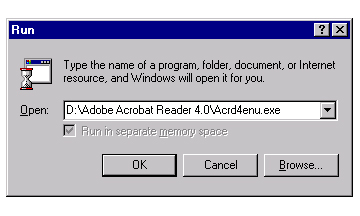
Note: your computer may have a different drive letter for the CD-ROM such as E:\ or F:\
If this is the case, change the "D" to the drive letter for your CD-ROM.
Example: E:\Adobe Acrobat Reader 4.0\Acrd4enu.exe
3. Click "OK" and follow the instructions provided.
Adobe Acrobat Reader is a registered trademark of Adobe Systems Incorporated. For more information, go to www.adobe.com